
The problem
The PC felt sluggish in everyday use, and it got worse the more tabs were open in the web browser: with a larger number of tabs, everything slowed down.
Diagnosis and testing
CPU-Z showed the whole system running on a single 4 GB DDR3 module, in single-channel mode. That is very little memory for a modern web browser with many tabs open, which matched the symptoms.
The PC already had an SSD, so the upgrade focused on memory. The motherboard has four memory slots, which left room to fit a matched pair of larger modules.
Measurements — read with the conditions shown
- BeforeInstalled memory4 GB
One DDR3 module, read in CPU-Z
- BeforeChannel modeSingle
Read in CPU-Z
- AfterInstalled memory16 GB
Two 8 GB DDR3-1600 modules, read in Windows Task Manager
- AfterChannel modeDual
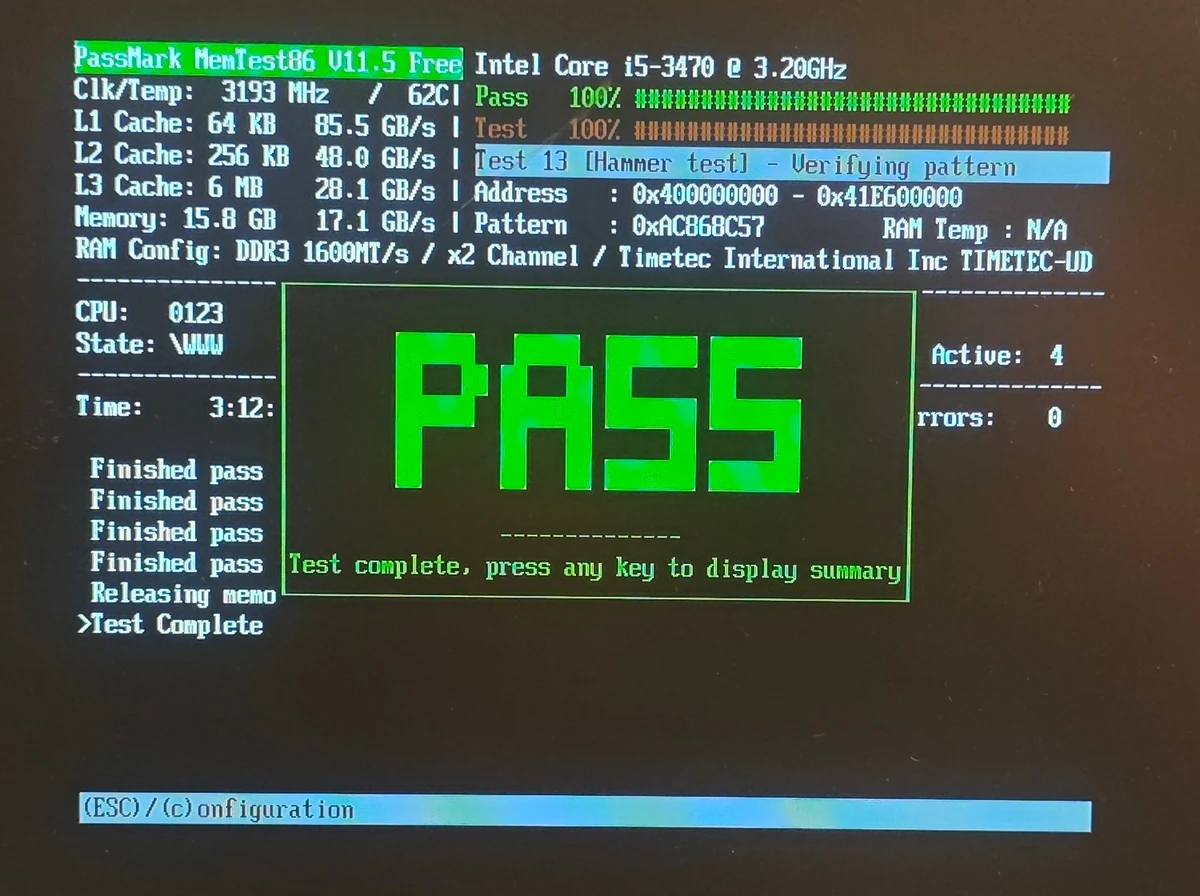
Read in MemTest86
- AfterMemTest86 errors0
MemTest86 V11.5, four full passes
| Stage | Reading | Value | Conditions |
|---|---|---|---|
| Before | Installed memory | 4 GB | One DDR3 module, read in CPU-Z |
| Before | Channel mode | Single | Read in CPU-Z |
| After | Installed memory | 16 GB | Two 8 GB DDR3-1600 modules, read in Windows Task Manager |
| After | Channel mode | Dual | Read in MemTest86 |
| After | MemTest86 errors | 0 | MemTest86 V11.5, four full passes |
Work carried out
- Removed the original 4 GB DDR3 module
- Fitted two 8 GB DDR3-1600 modules (16 GB in total) as a matched pair, so they run in dual channel
- Ran MemTest86 on the new memory: four full passes with no errors
- Checked in Windows that all 16 GB was recognised at 1600 MHz
The result
Upgrade completed: Windows reports 16 GB of DDR3 running at 1600 MHz, MemTest86 confirms the memory is running in dual channel, and all four test passes finished with zero errors.
I did not take timed before-and-after measurements, so this write-up shows the change in memory configuration and a clean memory test rather than a speed benchmark.
What this case shows
If a PC slows down as you open more browser tabs, check how much memory is actually in use while the slowdown is happening; the Memory page in Task Manager shows this. If usage sits close to the installed amount, more RAM is worth considering. Before buying anything, check what the motherboard supports: the memory type (DDR3 in this PC), the maximum capacity and the number of free slots. In a case like this, capacity matters most. Fitting a matched pair so the memory runs in dual channel is a sensible choice, but dual channel on its own does not solve a shortage of memory.