The problem
The console overheated during games: the PS5 overheating warning came up and the console switched itself off. On one occasion it happened after about 15 minutes of play, on another after about 30.
Diagnosis and testing
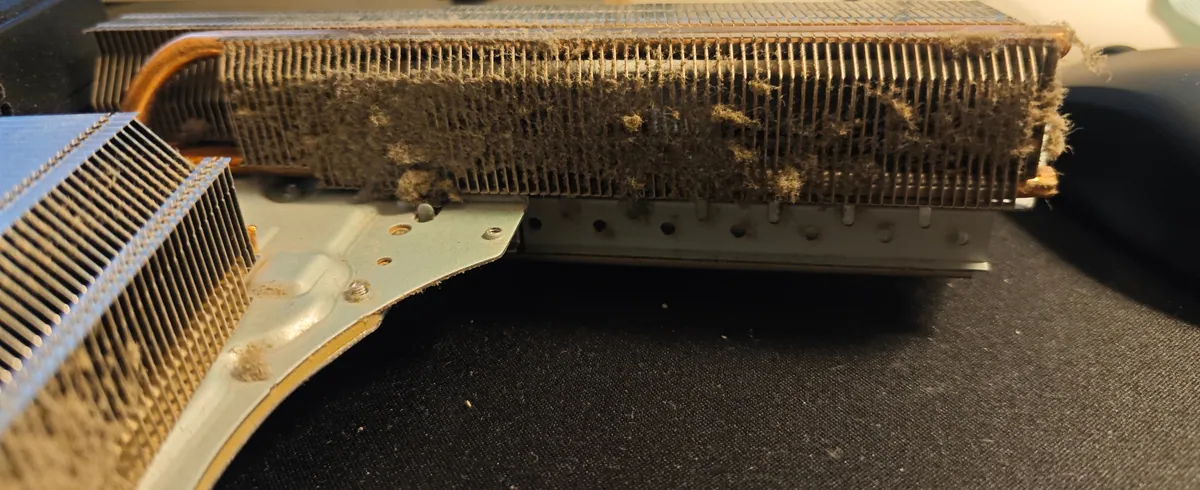
With the covers off, the dust was easy to see. The fan blades and hub were coated, the opening around the fan was lined with dust, and the heatsink fins were packed with it along their whole length. Fins blocked like this restrict the airflow the fan relies on to carry heat away.
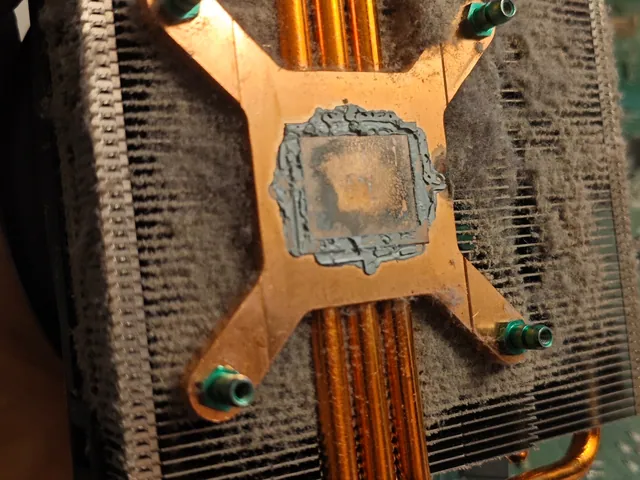
The PS5 uses liquid metal rather than ordinary thermal paste between the processor and the heatsink. When I lifted the heatsink, the old liquid metal had been pushed out towards the edges of the chip, leaving a thin, dull layer in the middle, which is exactly where contact with the heatsink matters most. The heatsink's contact surface showed the same pattern.
Measurements — read with the conditions shown
- BeforeTime to overheating warning15–30 minutes
During games: about 15 minutes on one occasion, about 30 on another
- AfterGaming testSeveral hours
Marvel's Spider-Man 2, no overheating warning and no shutdown
Not a temperature measurement: the PS5 doesn't show its temperatures to the user.
| Stage | Reading | Value | Conditions |
|---|---|---|---|
| Before | Time to overheating warning | 15–30 minutes | During games: about 15 minutes on one occasion, about 30 on another |
| After | Gaming test | Several hours | Marvel's Spider-Man 2, no overheating warning and no shutdownNot a temperature measurement: the PS5 doesn't show its temperatures to the user. |
Work carried out
- Took the console apart and removed the fan and the heatsink
- Cleaned the dust out of the fan, the fan opening and the heatsink fins
- Removed the old liquid metal and cleaned the chip back to a mirror finish
- Applied fresh liquid metal and refitted the heatsink
- Reassembled the console and tested it with several hours of Marvel's Spider-Man 2
The result
Repair completed: after the clean-out and the new liquid metal, the console ran Spider-Man 2 for several hours without the overheating warning and without switching itself off.
I cleaned the cooling system and replaced the liquid metal in the same visit, so I can't say how much of the improvement came from each step.
The PS5 doesn't show its temperatures to the user, so there are no before-and-after temperature readings. The result is based on the console running for several hours of gaming without the warning.
What this case shows
If a PS5 shows its overheating warning even though it has free space around its vents, the cause is likely inside. Dust in the fan and heatsink is easy to spot once the covers are off. The liquid metal under the heatsink is a different job: it conducts electricity, so it has to be cleaned off and reapplied carefully, without letting it touch the components around the chip.